
SEO ROI Calculator
What could SEO be worth to you?
See what SEO could return for your business. Our free SEO ROI calculator works out your return on profit and shows every step of the working.
Why we measure on
Profit, not revenue
Revenue is what comes in. Gross profit is what is left once each sale has covered its own costs, and that is the money that pays for SEO. So every return on this page is based on profit, not revenue.
Example: £100,000 of organic revenue, from £24,000 invested in SEO over 12 months, at a 40% gross margin.
Two ways to forecast
Pick the mode that matches what you know. Both use the same build-up, sales funnel and profit maths. Only the way new visitors are worked out changes.
Start from the growth you aim for
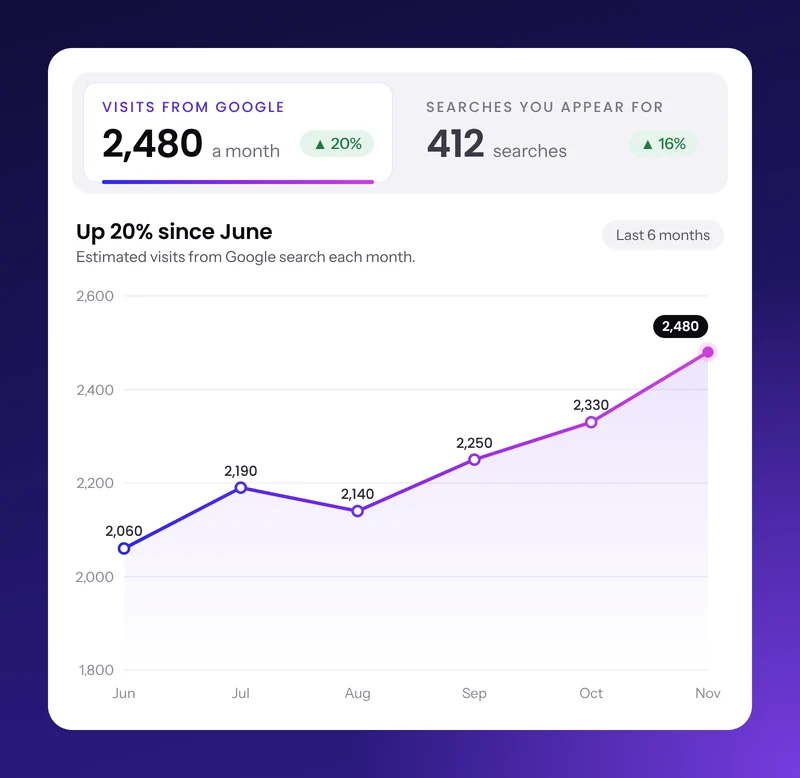
Enter your current traffic from Google and the increase you aim for, for example +50%.
You needYour current traffic: the average number of visitors you get from Google each month. Not sure? Our free search visibility audit shows it.
Start from real search demand
Enter the average monthly searches for the keywords you want to win and the position you aim for. We apply the click-through rate for that position from Advanced Web Ranking, and you can compare the top 10, top 3 and position 1 side by side.
You needThe average monthly search volume of the keywords you rank for, or want to rank for
How it compares
| Most SEO ROI calculatorsThe usual approach |  Our SEO ROI calculatorVisible Websites | |
|---|---|---|
| Return measured on | Revenue | Gross profit, after costs |
| Your current traffic | New visitors only | Included, with the share SEO adds shown separately |
| New visitors | Counted in full from the first month | Arrive progressively, in line with Google’s guidance |
| Click-through rates | General industry averages | Advanced Web Ranking data by position, July 2026 |
| Type of business | One type: leads or online sales | Services, products or both |
| The working | The final figures | Every step, with the formulas and their sources |
Free calculator
Calculate your SEO ROI
Every result comes with the full working.
How we worked this out
Your figures over 24 months, step by step.
- Current traffic (organic visitors)
- 3,000 a month × 24 months
- 72,000
- New visitors from SEO (incremental traffic)
- 3,000 a month × 50% increase = up to 1,500 a month, building up over the first 12 months
- 27,660
- Total visitors from Google (organic traffic)
- 72,000 + 27,660, reaching 4,500 a month by month 24
- 99,660
- Enquiries (leads)
- 99,660 × 3%
- 2,990
- Customers (conversions)
- 2,990 × 25%
- 748
- Revenue
- 748 × £1,000
- £748,000
- Profit (gross profit)
- £748,000 × 40%
- £299,200
- Profit from new visitors (incremental profit)
- £299,200 × 27,660 new ÷ 99,660 total visitors
- £83,041
- SEO cost (investment)
- £2,500 × 24 months
- £60,000
- Return on investment (ROI)
- (£299,200 − £60,000) ÷ £60,000
- 399%
New visitors from SEO are your current traffic × the increase you aim for. For a new website, they are the visitors you aim for each month. Rankings take time, so new visitors build up month by month: they start slowly, reach about half by month 6 and are close to the full amount by month 9, in line with Google's guidance, in its video How to hire an SEO, that SEO usually needs four months to a year to show results. Visitors, enquiries, customers and orders are counted in whole numbers. Return on investment is the profit from all your visitors from organic search (current traffic plus new visitors) minus the SEO cost, divided by the SEO cost.
The formulas
Every formula behind your result
The exact maths the calculator uses, step by step, with the sources behind each formula. Open a step to see how it is worked out.
StandardNew visitors from SEO=Current traffic × Traffic increase you aim for[1][2]
AdvancedNew visitors from SEO=Average monthly searches × Click-through rate (CTR) at your target position[3][4]
Click-through rate by target position Top 10Average of positions 1 to 10 3.98% Top 3Average of positions 1 to 3 11.42% Position 1The first organic result 20.02% Not sure of your current traffic? Our free search visibility audit estimates your monthly visitors from Google.
Sources: [1] Google Analytics Help, [2] Google Search Console Help, [3] Advanced Web Ranking, [4] Google Ads Help
New visitors in a month=New visitors from SEO × Build-up share for that month[5]
Build-up share by monthClose to 100% from month 13
Slow at first, about half by month 6 and close to full by month 9, in line with Google’s guidance that SEO usually needs four months to a year to show results.[5]
Sources: [5] Google Search Central
Current traffic over the time frame=Current traffic × Number of months[1]
New visitors over the time frame=The new visitors from each month, added together
Total visitors from Google=Current traffic over the time frame + New visitors over the time frame
Sources: [1] Google Analytics Help, [2] Google Search Console Help
Visitors to your services=Total visitors from Google × Traffic split
Visitors to your shop=Total visitors from Google − Visitors to your services
Enquiries (leads)=Visitors to your services × Lead conversion rate[6]
Customers=Enquiries × Close rate[7]
Orders=Visitors to your shop × E-commerce conversion rate[6]
The traffic split is 100% for a services business and 0% for a shop.
Sources: [6] Google Ads Help, [7] HubSpot
Service revenue=Customers × Customer lifetime value (CLV)[8]
Shop revenue=Orders × Average order value (AOV)[9]
Revenue from Google (organic revenue)=Service revenue + Shop revenue
Sources: [8] IBM, [9] Shopify
Gross profit=Service revenue × Service gross margin + Shop revenue × Product gross margin[10]
Profit from new visitors (incremental profit)=Gross profit × New visitors over the time frame ÷ Total visitors from Google
Sources: [10] Investopedia
SEO investment=Monthly SEO investment × Number of months + One-off setup cost
Net profit=Gross profit − SEO investment
ROI (%)=(Gross profit − SEO investment) ÷ SEO investment × 100[11]
Sources: [11] Investopedia
References
- Google Analytics Help. [GA4] Traffic acquisition report.
- Google Search Console Help. Performance report (Search results): Overview and basic setup.
- Advanced Web Ranking. Google Organic CTR by Position: 2026 Study + AI Overviews (Google desktop, July 2026).
- Google Ads Help. Clickthrough rate (CTR): Definition.
- Google Search Central. How to hire an SEO (video, Maile Ohye, 14 February 2017).
- Google Ads Help. Conversion rate: Definition.
- HubSpot. Closing Ratio: definition and how to calculate it.
- IBM. What is customer lifetime value (CLV)?.
- Shopify. Average Order Value (AOV): Formula & Tips.
- Investopedia. Gross Margin: Definition, Example, Formula, and How to Calculate.
- Investopedia. What Is Return on Investment (ROI) and How to Calculate It.
Rounding: visitors, enquiries, customers and orders are counted in whole numbers at each step (halves round up), money to the nearest whole unit (to the penny below 10) and rates to two decimal places, so every line of the working multiplies out exactly. All figures exclude VAT.
SEO ROI, answered.
What SEO ROI is, why it is worth measuring and how to measure it, plus how to get the most from the calculator. If you’d like to ask us anything else, we’re here to help.
SEO ROI explained
SEO ROI (return on investment) compares what search engine optimisation earns your business with what it costs. It is usually shown as a percentage: an ROI of 200% means every £1 spent on SEO came back as £3, the original £1 plus £2 on top.
Our calculator measures it on gross profit, so the figure shows what SEO adds after the cost of your products or services.
ROI (%) = (Gross profit from organic search − SEO investment) ÷ SEO investment × 100. Gross profit is your organic revenue × your gross margin, and SEO investment is everything you spend on SEO over the same period.
For example, £40,000 of gross profit from a £24,000 investment gives (£40,000 − £24,000) ÷ £24,000 × 100 = 67%. Every formula the calculator uses is in the formulas section.
Because revenue is not what you keep. Say SEO brings in £60,000 of sales at a 50% gross margin, and the campaign costs £12,000. On revenue, the ROI looks like 400%. On profit, you keep £30,000 of those sales, so the ROI is 150%.
Both are good results, but only the profit figure shows what SEO adds to your bottom line, which is the number that matters when you set a budget.
It tells you whether SEO is paying for itself, how it compares with other channels such as Google Ads and how much you can sensibly invest. Rankings and traffic matter, but neither pays the bills on its own. A forecast before you start also sets clear expectations for you and your agency.
Anything above 0% means SEO earned back more profit than it cost, and 100% means it doubled your money. There is no single benchmark, because margins, sale values and competition vary so much between industries.
A return measured on profit will always look lower than the revenue-based figures many calculators show, so compare like with like. The more useful question is whether SEO beats the other ways you could spend the same budget.
Google’s own guidance, in its video on how to hire an SEO, is that SEO usually needs four months to a year to show results. Our calculator reflects that: new visitors start slowly, reach about half their full level by month 6 and are close to full by month 9.
That is why the same campaign shows a higher ROI over 24 or 36 months than over 12. The early months carry the cost while rankings build.
Everything you spend to win organic traffic: your agency or freelancer retainer, SEO tools, content writing, link building and digital PR, developer time for technical fixes and the time your own team spends on it.
In the calculator, enter the monthly amount as your SEO retainer and any one-off spend, such as a website fix, as the upfront investment in Advanced mode.
They work differently. Google Ads brings visitors as soon as you pay and stops when you stop, so every click carries a cost. SEO takes longer to build, but the visitors it wins keep arriving without a cost per click, so the return tends to grow over time.
Many businesses use both: Ads for demand they need to win now, SEO for a lower cost per customer over the long run.
Rankings rarely disappear overnight. Pages that rank well often hold their positions for a while, then slip as competitors publish new content, earn links and improve their sites. How fast depends on your market. The calculator assumes the investment continues for the whole time frame you choose.
Yes. If the profit from organic search is less than you spend on SEO over the period, the ROI is negative and the calculator shows it in red. It is most common over short time frames, for new websites and for businesses with low margins or low sale values. Try a longer time frame, or see what a better conversion rate would change.
Using the calculator
Business owners deciding whether SEO is worth it, marketers building a business case and anyone comparing SEO proposals. It works for service businesses that win enquiries, online shops and businesses that do both.
Yes. There is no sign-up and no email form. Results update as you type, and you can download them as a three-page PDF report: your result, the figures you entered and the full working.
Both use the same build-up, sales funnel and profit maths. They differ in how new visitors are estimated. Standard starts from your current traffic and the growth you aim for.
Advanced starts from search demand: the average monthly searches for your keywords × the click-through rate at the position you aim for. It also lets you add a one-off setup cost and compare the return at the top 10, top 3 and position 1.
Our free search visibility audit shows your monthly traffic from Google. If you use Google Analytics 4, go to Reports, then Acquisition, then Traffic acquisition, and look at Organic Search: the Sessions column counts your visits from Google. Use a monthly average from the last few months. If you only have Google Search Console, the monthly clicks in the Performance report are a close stand-in.
New website? Enter 0, and the calculator asks for the visitors you aim for instead.
Keyword tools such as Semrush or Google Keyword Planner show the average monthly searches for each keyword. Add up the keywords you want to rank for, in the country or area you serve. Keyword Planner is free with a Google Ads account, though it shows ranges rather than exact figures unless you are running ads.
Advanced mode uses Advanced Web Ranking’s click-through rate data for Google desktop results, July 2026: 20.02% for position 1, 11.42% on average across the top 3 and 3.98% on average across the top 10.
Your own rates can differ with ads, map results and AI Overviews on the page. If you know your click-through rate from Search Console, keep it in mind when you read the result.
Because most clicks go to the first few results. In the data we use, position 1 gets 20.02% of clicks, about five times the 3.98% average across the top 10. Moving into the top three often does more for your return than ranking for more keywords lower down the page.
Use your own figures if you have them: enquiries ÷ visitors for your services and orders ÷ visitors for your shop, both from Google Analytics. If you don’t, the example figures are a sensible starting point (3% of visitors getting in touch, 2% placing an order). Then try a lower figure to see how much your return depends on it.
Multiply what a customer spends per visit or purchase by how many times they buy in a year, then by how many years they usually stay. A salon client who spends £80 a visit, eight times a year, for three years is worth £80 × 8 × 3 = £1,920. If customers usually buy once, use your average sale value.
Gross margin is the share of each sale you keep after the direct cost of delivering it: materials, stock, delivery and the time spent on the job. Gross margin = (Revenue − Cost of sales) ÷ Revenue.
Your accountant or your profit and loss statement will have it. Not sure? 40% is a fair guess for many services and 45% for many shops.
The headline ROI covers all your visitors from organic search, the way most businesses report on the channel as a whole. The result also shows how much of the profit comes from the new visitors SEO brings, and the working lists it as incremental gross profit, so you can judge both.
Yes. Enter 0 as your current traffic and the calculator asks for the monthly visitors you aim for, with 3,000 as the example figure. They build up over the first year like any other SEO campaign, so a new website usually needs a longer time frame to show its full return.
The maths is exact: every figure follows from the numbers you enter, and the working shows each step. The forecast itself is only as good as those numbers and our assumptions, such as how quickly rankings build. Treat it as a planning estimate, not a guarantee, and run it with cautious figures as well as hopeful ones.
No. It covers visitors from Google’s organic search results. Visits from AI assistants such as ChatGPT, Perplexity and Gemini come on top. If you want to be named in AI answers too, see how our GEO service works.
Enter your figures without VAT. Customer value, order value and your SEO investment should all exclude it, and so do the results.
Pounds, US dollars, euros and UAE dirhams. Pick one from the list next to the mode switch. The maths is the same in every currency.
The calculator estimates what better rankings could be worth. Our free Search visibility audit shows where you stand today: your traffic from Google, how often AI answers link to you and what you could gain in the top three. Use the audit to find the opportunity and the calculator to put a value on it.
Improving your return
Three levers matter most: rank higher for the searches that bring buyers, convert more of the visitors you already get and raise what each customer is worth. Conversion is often the quickest. Lifting your conversion rate from 2% to 3% brings 50% more customers from the same traffic, and 50% more gross profit.
Set up Google Analytics 4 with conversions for your forms, calls and orders, connect Google Search Console and record which leads become customers in your CRM. Then compare the gross profit from organic search with your SEO costs each month.
Our clients get a live Data Studio dashboard that tracks it all, from traffic and conversion rate down to bookings and sales, split by source.
Yes. Tell us about your project and we’ll look at your traffic, rankings and competitors, then put real numbers behind this estimate: the keywords worth targeting, the positions within reach and what it would take to get there.
Let’s get started
Tell us about your project
Complete the form and let’s make your brand impossible to miss.
We’ve got our eye on it.
We will get back to you soon.
While we review your enquiry, check your AI and search visibility score.